FASHION
Best Embroidery Digitizing Software for Mac in 2025

Published
2 months agoon
By
Steven
For Mac-using embroiderers, the software landscape has often felt like a secondary consideration, with the industry’s powerhouse tools traditionally built for Windows. But as creative professionals increasingly choose Apple’s ecosystem, the demand for robust, native Mac-compatible software has grown—and developers have listened. In 2025, Mac users have more powerful and accessible options than ever before to create and edit custom embroidery designs. Finding the right tool can transform your workflow from a series of workarounds to a seamless creative process. This guide breaks down the top contenders for the Best Embroidery Digitizing Software for Mac, helping you choose the right platform to bring your stitch-based visions to life.
Introduction: The Modern Mac Digitizing Landscape
Gone are the days when your only option was to run clunky Windows emulation software. Today, you have a mix of excellent native Mac applications, powerful cloud-based platforms that work in any browser, and a couple of industry stalwarts that have finally embraced Apple silicon. The right choice for you hinges on what you want to do: are you a hobbyist looking to personalize designs, a small business owner needing to digitize logos, or an artist pushing the boundaries of thread-based art?
Digitizing software is the bridge between your creative idea and your embroidery machine. It allows you to transform vector artwork, photographs, or sketches into a stitch file (like PES, DST, or JEF) that your machine can read. For Mac users in 2025, the key is finding software that not only functions but feels at home in the macOS environment—intuitive, stable, and designed to leverage the hardware you love.
Top Contender #1: Embrilliance (The Mac-Native Powerhouse)
For years, Embrilliance has been the darling of the Mac embroidery community, and in 2025, it remains a top-tier choice.
- Why It’s a Top Pick for Mac: This software was designed from the ground up for macOS. It’s not a port; it feels like a natural Mac app with a clean, approachable interface. It’s modular, meaning you can start with an affordable base package (Embrilliance Essentials) and add more advanced “StitchArtist” modules for digitizing from scratch as your skills grow.
- Key Features & Workflow: Embrilliance excels at lettering, monogramming, and working with pre-made designs. Its strength lies in its logical, non-intimidating toolset. For digitizing, the StitchArtist modules use a point-by-point, “connect-the-dots” approach that many find more intuitive than the complex parameter boxes of high-end industrial software. It exports to all major machine formats.
- Best For: Hobbyists, monogram businesses, small boutique owners, and anyone who values a Mac-first experience without a steep learning curve. It’s the perfect “prosumer” tool.
Top Contender #2: StitchArtist by Embrilliance (The Dedicated Digitizing Module)
While part of the Embrilliance ecosystem, StitchArtist deserves its own mention as it represents the full digitizing capability within that family.
- Why It’s a Top Pick for Mac: If you need to create designs from nothing but an idea or a sketch, StitchArtist (Levels 1, 2, and 3) provides the tools. It runs seamlessly within the Embrilliance platform, maintaining that native Mac feel. Level 1 handles basics, Level 2 adds fills and complex patterns, and Level 3 unlocks full manual control for satin stitches and lettering.
- Key Features & Workflow: It uses a manual punch tool metaphor, giving you direct control over stitch placement, type, and density. It’s fantastic for creating clean, vector-based embroidery from simple artwork.
- Best For: Users committed to the Embrilliance ecosystem who want to grow into serious digitizing without leaving their familiar, Mac-optimized software.
Top Contender #3: Hatch by Wilcom (The Professional-Grade Performer)
Wilcom is a titan in the embroidery software world, and its Hatch Embroidery line is a game-changer for Mac users seeking professional power.
- Why It’s a Top Pick for Mac: Hatch is a fully-featured, standalone application that runs natively on both Windows and macOS (including Apple Silicon M-series chips). It brings the renowned Wilcom digitizing engine—used by major apparel decorators worldwide—to the Mac desktop. Its interface is modern, sleek, and surprisingly approachable given its depth.
- Key Features & Workflow: Hatch offers a true all-in-one experience: powerful auto-digitizing tools for converting vector art, comprehensive manual digitizing suites, extensive lettering tools, and a vast library of included designs. Its 3D stitch preview is exceptional. You can start with a tiered system (Hatch 1, 2, or 3) based on your needs.
- Best For: Serious hobbyists transitioning to professional work, small to medium-sized businesses, and anyone who wants industry-standard tools without running Windows. It’s the best blend of professional power and Mac accessibility in 2025.
Top Contender #4: Ink/Stitch (The Free & Open-Source Innovator)
For the tech-savvy and budget-conscious, Ink/Stitch offers an incredibly powerful solution—with the trade-off of a steeper learning curve.
- Why It’s a Top Pick for Mac: It’s a free, open-source extension for the also-free vector graphics program Inkscape, which runs perfectly on Mac. This combination is 100% free and constantly improved by a global community.
- Key Features & Workflow: You create your design using Inkscape’s robust vector drawing tools, then use the Ink/Stitch palette to assign embroidery properties (stitch type, density, underlay) and export to any machine format. It offers remarkable control and is fantastic for artists already comfortable with vector workflows.
- Best For: DIY enthusiasts, tinkerers, educators, and artists who love open-source software and don’t mind a learning curve. It’s unparalleled for the price (free) and integrates digitizing into a graphic design workflow.
Top Contender #5: Cross-Platform & Cloud-Based Solutions
The line between operating systems is blurring, thanks to modern development.
- SewWhat-Pro / SewArt: These are older, lighter-weight Windows applications that have historically run very well on Macs using a compatibility layer like Wine or CrossOver. They are not native, but they are affordable, reliable for basic viewing and conversion, and a known quantity for many embroiderers.
- Browser-Based Services: While not traditional software, professional online digitizing services (like TheDigitizers or Digitized) are 100% Mac-compatible. You upload your artwork via a web browser, and a human digitizer creates your file. This is an excellent option for occasional, complex logos without any software investment.
Key Decision Factors for Mac Users in 2025
Choosing the right tool depends on your answers to these questions:
- What’s Your Skill Level & Goal?
- Beginner/Personalizer: Start with Embrilliance Essentials.
- Aspiring Digitizer: Move to Embrilliance StitchArtist or Hatch 2.
- Professional/Business: Hatch 3 provides the most comprehensive toolset.
- Artist/Experiments: Ink/Stitch offers limitless creative potential.
- What’s Your Budget?
- $0: Ink/Stitch (with Inkscape).
- $$ ($100 – $300): Embrilliance modular packages.
- $$$ ($700 – $1,300): Hatch tiered licenses (one-time purchase).
- What’s Your Workflow?
- Do you work from vector art (logos)? Hatch’s auto-digitize is superb.
- Do you create art from scratch? StitchArtist or Ink/Stitch’s manual tools are key.
- Do you mainly letter and combine designs? Embrilliance is incredibly efficient.
Conclusion: A Thriving Ecosystem for Mac Stitchers
The search for the Best Embroidery Digitizing Software for Mac in 2025 no longer requires compromise. You have clear, powerful paths:
For a native Mac experience that grows with you, the Embrilliance platform is unmatched in its integration and ease of use.
For professional-grade power in a native Mac package, Hatch by Wilcom is the industry leader now fully accessible to Apple users.
For maximum flexibility and zero cost, the Ink/Stitch and Inkscape combination is a revolutionary tool for those willing to learn its system.
Your choice ultimately empowers you to stop wrestling with compatibility and start focusing on creation. The right software will feel like a natural extension of your Mac, turning your creative concepts into stitch-perfect reality with efficiency and joy. Evaluate your needs, take advantage of free trials where offered, and embrace the fact that as a Mac-based embroiderer, your toolkit is now both powerful and perfectly tailored to your machine.
You may like
FASHION
Everyday Wear You Can Trust Raspberry Hills
Published
1 month agoon
January 13, 2026By
Steven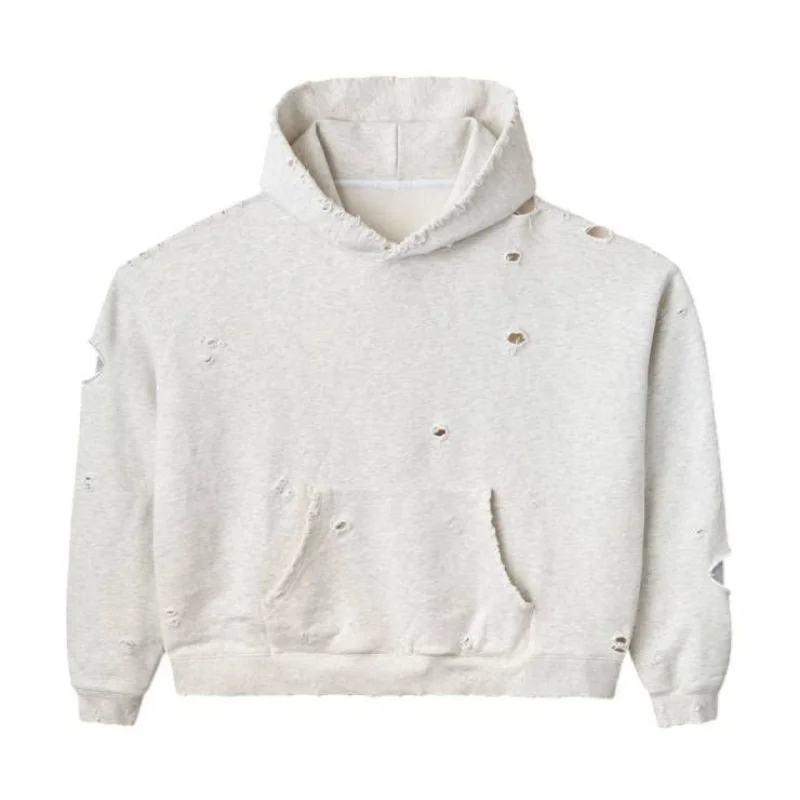
Finding normal garb that truly supplies on consolation, durability, and contemporary-day fashion isn’t easy. In the fast-transferring style of America, human beings need pieces they can depend on garments that feel accurate from morning to night, look sharp without effort, and ultimate past one season. This is precisely where Raspberry Hills stands proud as a logo constructed for actual life.
Every piece is designed for folks who prize simplicity, exceptional quality, and confidence. Instead of chasing short-term trends, the point of interest stays on an undying normal put on that suits easily into your everyday routine. From early mornings to overdue evenings, that is what you may agree with with out 2d-guessing your desire.
Built for Real Comfort, Not Just Looks
Comfort ought to in no way be optional. That’s why Raspberry Hill clothing is created using top-class fabric that feels smooth on the skin whilst ultimate breathable and flexible. Whether you’re jogging errands, operating from home, or heading out casually, the consolation remains steady all day long.
Unlike fast-style objects that lose form after some washes, those clothes are engineered to keep their shape. In America, where each day puts on wishes to address busy schedules and sundry climates, reliable consolation will become a life-style necessity instead of a luxury.
Everyday Style That Feels Effortless
Modern fashion would not want to be loud. Raspberry Hills Clothing garb is designed to combine seamlessly into your closet while nonetheless raising your average appearance. Clean lines, balanced suits, and impartial tones permit every piece to be styled in more than one way.
This versatility way fewer outfit choices and greater confidence. One nicely-made object can take you from a comfortable afternoon to a night out with ease. That’s the energy of normal put on achieved right—simple, dependable, and elegant without attempting too hard
Designed for American Lifestyles
Across America, human beings want garb that adapts to their routine. From metropolis streets to suburban consolation, this logo is familiar with the rhythm of contemporary-day American life. Each piece is examined for durability, motion, and lengthy-time period put on.
Whether you are walking, commuting, lounging, or traveling, the garb helps your life-style in place of prescribing it. That’s what makes it a reliable desire for normal put on—style that works with you, now no longer towards you.
Premium Hoodies Made for Daily Confidence
A hoodie ought to feel like a 2d pores and skin. Theraspberry hills hoodie supplies warm temperature without heaviness, shape without stiffness, and softness that lasts. It’s best for layering in cooler climates or carrying solo on slight days.
What truly sets it apart is its balance snug enough for enjoyable, delicate enough for informal outings. In America, where hoodies are a daily essential, this degree of exceptional makes a significant difference.
Shorts That Combine Ease and Performance
Not all shorts are created equal. Raspberry Hills shorts are designed with breathable substances and a tailor-made healthy fit that lets in freedom of motion whilst retaining a smooth appearance. They’re perfect for hot days, mild activity, or in reality enjoyable in consolation.
Instead of stretching out or fading quickly, those shorts keep their form and color, making them a dependable part of your normal clothes dresser.
Sweatpants That Redefine Casual Wear
Sweatpants are not restricted to lazy days. Raspberry hills sweatpants are made to supply comfort with a refined finish, creation them apt for both indoor and out of doors place on.
Soft fabric, robust seams, and modern cuts make sure they do not feel messy. For Americans who need comfortable garb without sacrificing fashion, those sweatpants provide the appropriate balance.
Why Everyday Wear Quality Matters
Cheap garb regularly fees greater withinside the long run. Poor substances, susceptible stitching, and fading hues suggest common replacements. Investing in exceptional normal put on saves time, money, and effort.
Raspberry Hills Garb specializes in longevity, supporting you construct a piece of furniture that you may agree with season after season.
Quick Overview of Key Benefits
| Feature | Everyday Advantage |
| Premium Fabric | Soft feel with long-lasting durability |
| Modern Fit | Comfortable yet polished appearance |
| Versatile Design | Easy to style for multiple occasions |
| Strong Stitching | Built for daily wear in the USA |
Ideal Use Cases at a Glance
| Situation | Why It Works |
| Daily errands | Comfortable and presentable |
| Casual outings | Stylish without effort |
| Home relaxation | Soft, breathable feel |
| Travel wear | Flexible and reliable |
A Brand You Can Rely On
Trust is earned via consistency. From hoodies to sweatpants, Raspberry Hills continues to supply reliable, normal clothing that meets actual expectations. Each piece displays cautious craftsmanship and considerate design.
For human beings within the USA who prioritize consolation, fashion, and durability, this logo gives a cloth dresser upgrade that truly lasts.
Make the Smart Choice Today
Your normal garb ought to work as hard as you do. Choosing Raspberry Hill clothing means selecting confidence, consolation, and lengthy-time period price. Upgrade your closet with pieces that help your life-style in place of complicating it.
Now is the time to spend money on normal but you may agree with it because comfort and fashion ought to in no way be compromised.
FAQs
Q1: Why ought I select Raspberry Hills for normal put on?
A1: Because it supplies rely on consolation, durability, and fashion improve your each day cloth dresser today.
Q2: Is raspberry hills garb appropriate for American life-style?
A2: Yes, it is designed to fit contemporary-day American workouts with dependable all-day comfort.
Q3: Does a Raspberry Hills hoodie preserve its form after washing?
A3: Absolutely make investments now in a hoodie that remains top class wash after wash.
Q4: Are Raspberry Hills shorts accurate for each day of use?
A4: Yes, they provide breathable consolation and lengthy-lasting exceptional—best for normal put on.
Q5: What makes Raspberry Hills sweatpants different?
A5: They integrate comfortable consolation with a smooth appearance—perfect for contemporary-day informal fashion.
Q6: Can I fashion Raspberry Hills’ garb easily?
A6: Yes, the flexible designs make styling simple—keep time and appearance higher each day.
Q7: Is this logo centered on a long-term exceptional?
A7: Definitely select a lasting price in place of changing reasonably-priced garb repeatedly.
Q8: Does raspberry hills cognizance on consolation or fashion?
It supplies each with consolation without sacrificing contemporary-day fashion.
Author link: https://atfboru.co.uk/
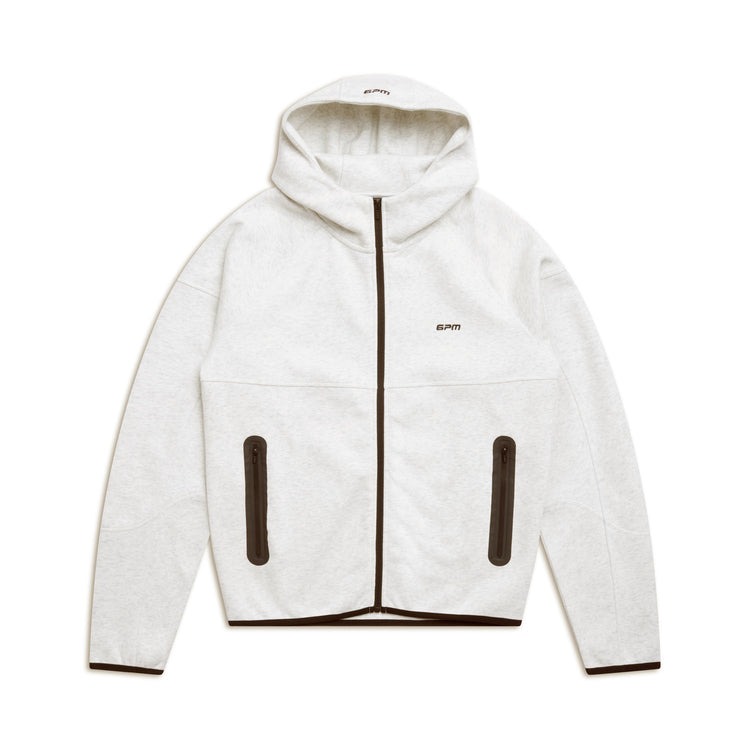
Looking for a premium hoodie in Germany? Below are the most searched and commonly asked questions about the 6pm Hoodie, including material, sizing, shipping, VAT, returns, and care. These answers are written to help you make an informed purchase and shop with confidence.
What material is the 6PM Hoodie made from?
The 6PM Hoodie is made from a high-quality cotton blend designed for softness, breathability, and durability. The fabric is suitable for daily wear and ideal for Germany’s cooler climate.
Is the 6PM Hoodie suitable for German weather?
Yes, the 6PM Hoodie is perfect for autumn and winter in Germany and works well during cool spring evenings. It provides warmth without feeling heavy.
How does 6PM Hoodie sizing work in Germany?
Our hoodies follow EU sizing standards. A detailed size chart in centimeters (cm) is available on the product page. For an oversized streetwear fit, we recommend ordering one size up.
Is the 6PM Hoodie unisex?
Yes, the 6PM Hoodie is a unisex design and fits both men and women comfortably.
How should I wash the 6PM Hoodie?
For best results:
- Wash inside out at 30°C
- Use mild detergent
- Do not bleach
- Do not tumble dry
- Iron on low heat if required
Proper care helps maintain color, fit, and fabric quality.
Does the 6PM Hoodie shrink after washing?
When washed according to the care instructions, the hoodie shows minimal to no shrinkage. Avoid high heat to preserve the original fit.
Does the color fade after multiple washes?
The 6PM Hoodie uses premium dyeing techniques to reduce fading. Following the recommended washing instructions will help keep the color fresh.
Does the hoodie include pockets and an adjustable hood?
Yes, the hoodie features a spacious front kangaroo pocket and an adjustable drawstring hood for everyday comfort.
Do you ship the 6PM Hoodie to Germany?
Yes, we offer fast and reliable shipping across Germany. Delivery typically takes 3–7 business days, depending on your location.
Are VAT and customs fees included for Germany?
Yes. All prices shown for Germany include VAT, and there are no additional customs charges for domestic or EU deliveries.
What is your return policy for German customers?
In accordance with EU consumer law, customers in Germany can return the hoodie within 14 days of delivery, provided it is unused and in original condition.
Is the 6PM Hoodie good for everyday wear?
Absolutely. The 6PM Hoodie is designed for daily use, making it perfect for casual wear, streetwear outfits, travel, or relaxing at home.
FASHION
Chromeheart Jeans Winter Sale USA – Shop Authentic Luxury Denim for Less This Season
Published
1 month agoon
January 13, 2026By
Steven
Winter in the USA isn’t just about cold weather—it’s the only time savvy buyers seriously hunt for Chromeheart jeans at reduced prices. The Winter Sale window is short, quiet, and extremely competitive. Chrome Hearts doesn’t flood the market with discounts, so when winter pricing appears, it’s a real opportunity, not marketing noise.
If your goal is to buy authentic Chromeheart jeans on sale in the USA, this guide is built for conversion. No recycled hype, no filler. Just clear buying logic, winter timing, and why acting now makes sense.
Why Chromeheart Jeans Are a Serious Investment
Before we even talk about discounts, understand this: Chromeheart jeans are not impulse denim. They’re built to last, styled to stand out, and priced accordingly.
Heavy Denim Built for Real Wear
Chrome Hearts uses thick, premium denim that feels solid the moment you touch it. These jeans don’t stretch out, don’t fade cheaply, and don’t collapse after a few wears. In winter, that extra weight adds warmth, making them practical for daily use across the USA.
Handcrafted Identity, Not Factory Denim
From leather cross patches to custom hardware and detailed stitching, Chrome Hearts denim feels personal. Nothing looks rushed. Each pair carries a handcrafted energy that mass-produced jeans simply don’t have.
Style That Doesn’t Expire
Chrome Hearts avoids trend cycles. Their jeans from years ago still look relevant today. That’s why people don’t just wear them—they collect them.
Buying during a winter sale doesn’t change the product. It just changes the price barrier.
Chromeheart Jeans Winter Sale USA – Why This Is Rare
Here’s the truth: Chrome Hearts doesn’t advertise sales. Winter discounts happen quietly through select USA retailers, clearing limited seasonal inventory.
That’s why Chromeheart Jeans winter sale USA searches spike every year. Buyers know this is the only realistic entry point below full retail.
What Legit Winter Sale Pricing Looks Like
Don’t expect insane markdowns. Real winter sales usually include:
- Controlled price reductions
- Limited waist sizes or washes
- No restocks once sold out
Even a small discount on Chromeheart jeans is meaningful because full retail pricing is the standard year-round.
Why Winter Stock Disappears Fast
Chrome Hearts already produces in limited quantities. Combine that with winter demand and sale pricing, and inventory moves fast—especially common USA sizes.
Waiting usually means missing out.
Most Sought-After Chromeheart Jeans During Winter Sales
Not every pair hits the sale floor, but some styles show up more often during winter.
Leather Cross Patch Chromeheart Jeans
The most iconic option. Bold, instantly recognizable, and high in resale value. Finding these during a winter sale is rare and valuable.
Clean Logo Chromeheart Jeans
More understated, easier to style daily. Perfect for buyers who want Chrome Hearts without loud detailing.
Distressed Chromeheart Jeans
Raw, aggressive, and street-focused. Winter sales sometimes include older, distressed releases at reduced pricing.
No matter the style, the core benefit stays the same: authentic Chromeheart jeans at winter-adjusted prices.
How to Buy Authentic Chromeheart Jeans on Sale in the USA
Winter sales attract both serious buyers and fake sellers. Knowing the difference matters.
Stick to Trusted USA Retailers
Only buy from established boutiques or verified online stores operating in the USA. Extreme discounts from unknown websites are a red flag.
Know the Quality Signals
Authentic Chromeheart Jeans feature:
- Dense, heavyweight denim
- Clean, reinforced stitching
- Premium leather patches and solid hardware
A winter sale does not reduce craftsmanship. If the jeans feel light or cheaply finished, walk away.
Be Realistic About Discounts
Chrome Hearts doesn’t drop to clearance pricing. A legit winter sale feels reasonable, not shocking.
Why Winter Is the Smartest Time to Buy Chromeheart Jeans
From a buyer’s perspective, winter checks every box.
You’re buying when:
- Retailers clear seasonal inventory
- Prices soften slightly
- Denim is worn daily
In the USA, winter outfits depend on quality jeans. A pair of Chromeheart jeans becomes a daily rotation piece, not a once-a-month flex.
That’s why winter sale traffic converts better than any other season.
Styling Chromeheart Jeans for Winter Streetwear
Chrome Hearts denim works best when it anchors the outfit.
For winter styling in the USA:
- Pair with heavyweight hoodies or knitwear
- Add leather jackets, puffers, or long coats
- Finish with sneakers or boots
Keep the rest simple. Let the jeans carry the look.
This versatility is exactly why buyers actively search for Chromeheart Jeans winter sale USA every winter.
Chromeheart Jeans USA Winter Sale – Best Time to Buy
Timing is everything.
In the USA, winter sales usually peak:
- Late November
- December holiday season
- Early January
Once this window closes, prices return to full retail, and availability drops. Chrome Hearts doesn’t hold discounted stock.
If you’re reading this during winter, you’re still in the window—but it won’t stay open long.
Long-Term Value of Chromeheart Jeans
Even when bought during a winter sale, Chromeheart jeans retain value.
They:
- Maintain strong resale demand
- Stay relevant year after year
- Outperform most designer denim in durability
That makes buying during winter not just cheaper—but smarter.
FAQs – Chromeheart Jeans Winter Sale USA
Are Chromeheart jeans’ winter sales legit?
Yes, when purchased from verified USA retailers. Winter sales are limited but real.
How much can I save during the winter sale?
Savings vary, but winter pricing is consistently lower than standard retail.
Do Chromeheart jeans fit true to size?
Most styles fit true to size, though some cuts are structured or slightly slim.
Will sold-out sizes restock during winter sales?
Rarely. Once a size sells out, it’s usually gone for the season.
Are Chromeheart jeans good for winter wear?
Yes. The heavyweight denim is ideal for cold weather.
Is buying Chromeheart jeans on sale worth it?
Absolutely. You get premium craftsmanship at a reduced entry price.
Final Take: Chromeheart Jeans Winter Sale USA Is the Window Buyers Wait For
No hype, no fluff—just reality. Chromeheart jeans are premium, limited, and rarely discounted. The Winter Sale in the USA is one of the only times buyers can secure them without paying peak retail.
Author link: https://atfboru.co.uk/



Trending

 FASHION1 month ago
Chromeheart Jeans Winter Sale USA – Shop Authentic Luxury Denim for Less This Season
- BUSINESS2 months ago
Palm Jebel Ali Villas: Off-Plan Opportunities You Shouldn’t Miss
- Blogs2 months ago
OVO Clothing Online Store
 TECHNOLOGY2 months ago
AI Detector: Redefining Originality in the Age of Infinite Content
- HEALTH2 months ago
How important is sperm morphology in a semen analysis normal report

 EDUCATION2 months ago
The Positive Power of Language Learning in Modern Life
- NEWS1 month ago
Time in Mumbai, India: Local Clock, Time Zone, and Planning Tips
 BUSINESS2 months ago
Vinny Pizza: A Flavor Story That Goes Beyond the Slice